

Getting back to the Nvidia Shield with some controller action.
It's Christmas, and apparently, what I got was a bunch of controllers that were broken. Perfect gift for a guy like me!
As you could see in the picture. We got two Nvidia Shield 2015 controllers, Model #P2570, and one 2017 Model #P2920. All on with stickers, saying two words, "no power." The P2920, we aren't going to focus on too much. Because in part, we've already talked about that controller a lot. But also after replacing the battery, we DID get it to power up, only to find out that the Bluetooth side refuses to engage when holding the Nvidia button (anyone who has brought the Bluetooth back from the dead from an electrical standpoint, feel free to comment below. There's absolutely no flashing white light. The charging circuit and USB plug seem to work fine.)
Okay! Read onwards if you want to see some pictures of controller guts and a half-assed review on the original controller Nvidia came with, known as the P2570.
The problem.
On both of the 2015 P2570 controllers. Upon plugging them in, we would get a flicker of life out of them before they shut themselves down immediately. First thought going through my head.
"Charging circuit is overwhelmed. Bad Battery. Shuts the whole controller down." - S
Given the overall condition of the controller, which looks/feels brand new. They were probably sitting some some dudes storage box for 10 years before eventually getting over to me!
The tear down.
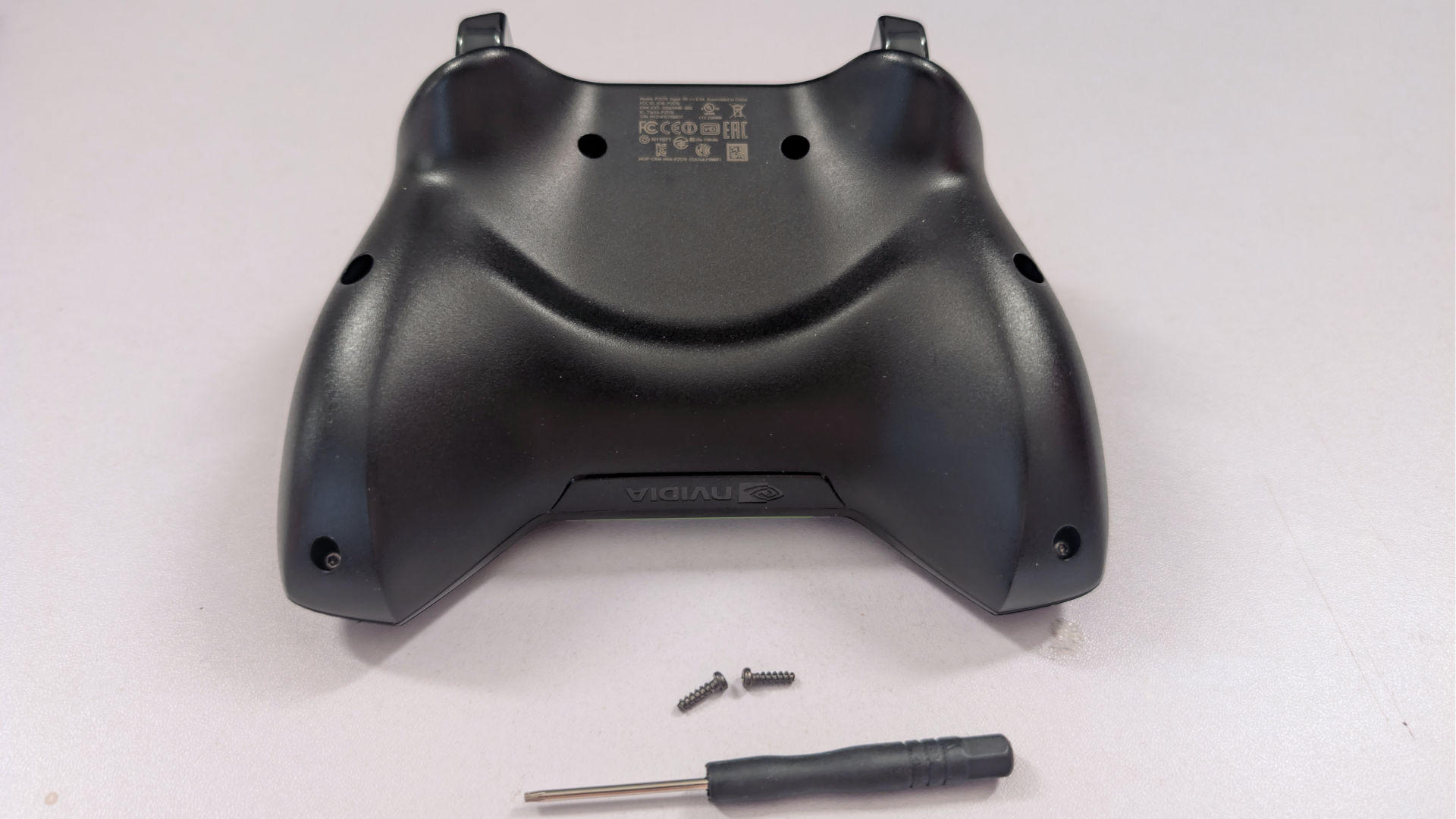
Just like their newer model of Shield Controllers, they used T6 screws instead of just Phillips, like sane human beings. Anytime you go below T8, the chances of stripping the screws increase, especially with the use of plastic stopping screws.
All of the screws are now removed (We did hear a 'crack' sound out of one of them. We'll get to that one in a bit). It's important to run your pick around to separate it slowly.
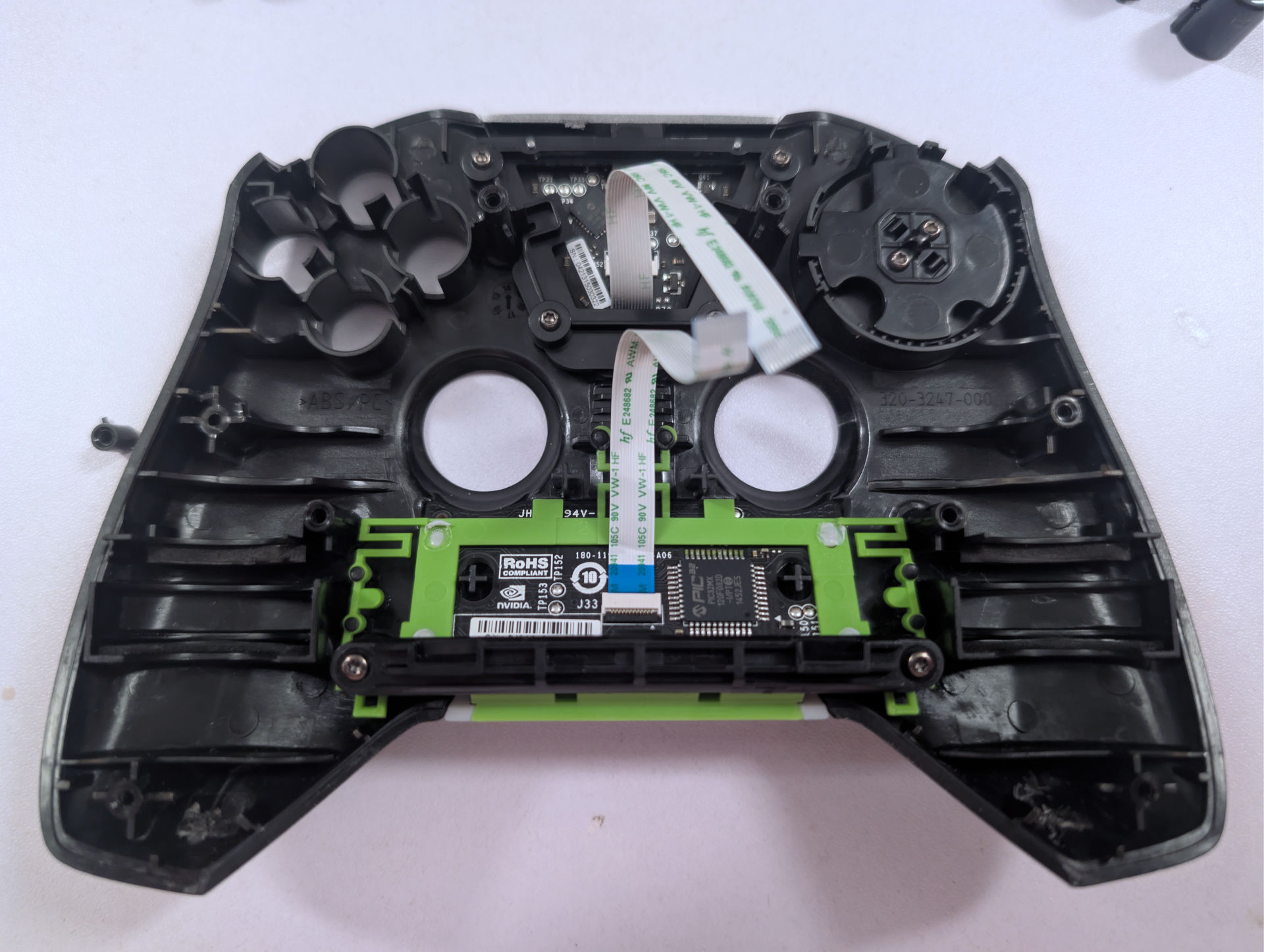
Not only do the BAXY buttons go flying. But we were very glad we didn't yank on the controller because there are two laptop-style edge connectors pressing everything together, similar to when we repaired the Corsair M65 mouse. Removal was straightforward, peeled back the yellow Kapton tape and, from there, tugged lightly, wiggling it back and forth until the connectors were free.
Remember that 'crack' sound we heard earlier? Yeah, one of the plastic stands the plastic screws were tapping in shattered. With some pliers, we removed the screw from it and will put it back in place with some Gorilla Glue and set it aside for now. We want to focus more on the bottom to get that battery out.
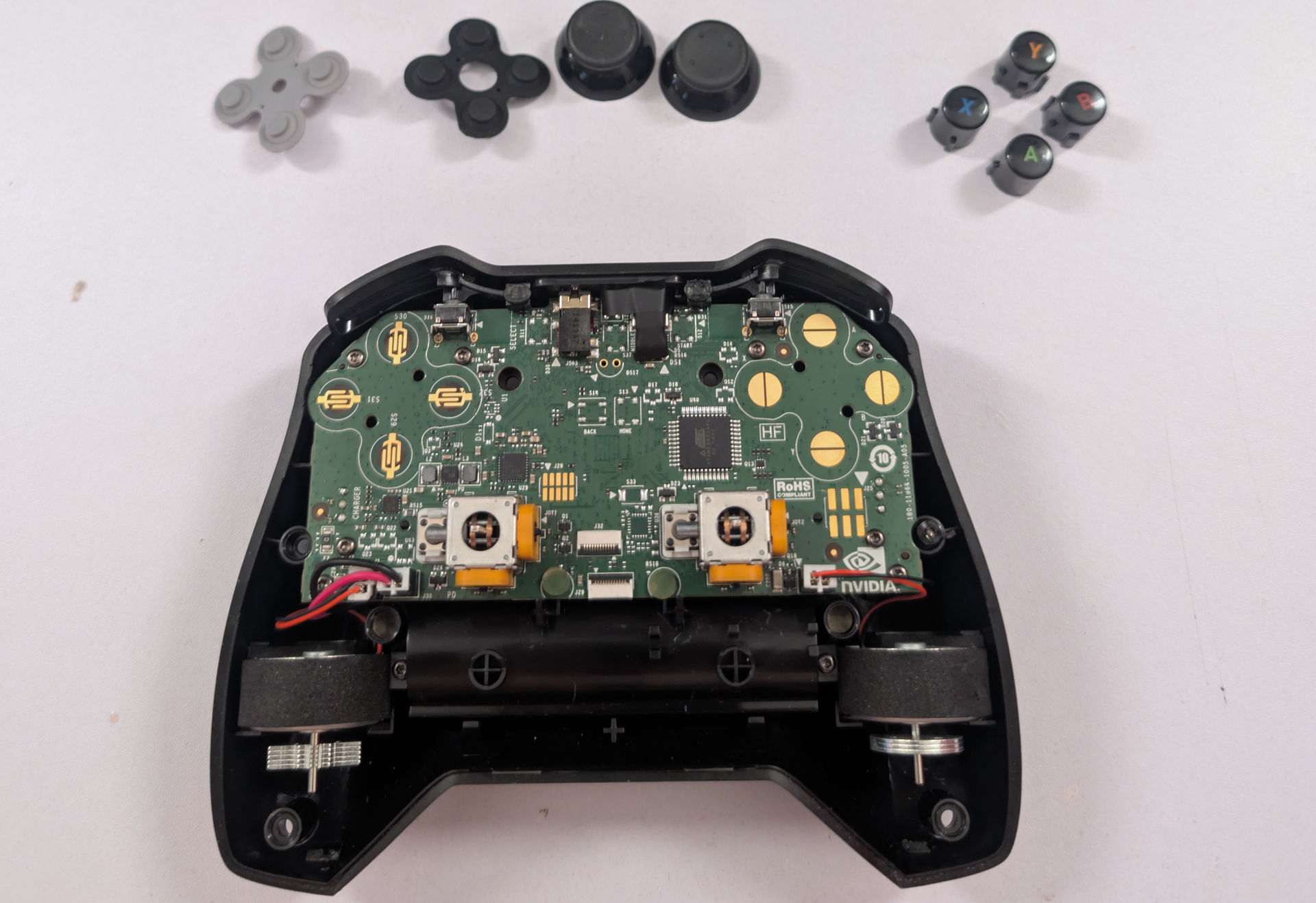
Hmm, the analog sticks are exactly like what you get in many of the third-party Xbox One controllers, such as "PowerA" or "HyperKin," when they reissued the Original Xbox Duke Controller, using a metal stem instead of the Alps plastic one. Replacement thumbsticks are more difficult to find on Aliexpress, but not entirely impossible.
Also, a side note: Avoid doing what we did upon laying it out and keep membranes in order! They both fit in fine. They both will operate fine. But the lack of a surface area around the grey membrane, if put into the D-Pad location, would result in a super-sloppy D-Pad feel. Black goes on the left side, and grey goes on the right side.
The battery (Which is a traditional 18650 lithium battery, like when we first started off playing with lithium batteries), we'll just remove the JP2 connector for now and continue removing the 8 screws holding down the mainboard, which comes out very smoothly. We didn't fight with the connectors for the vibrating motors and left them on the PCB.
We're a little bit blown away at how much ABS there is between the battery and the PCB. Most companies don't work like this.
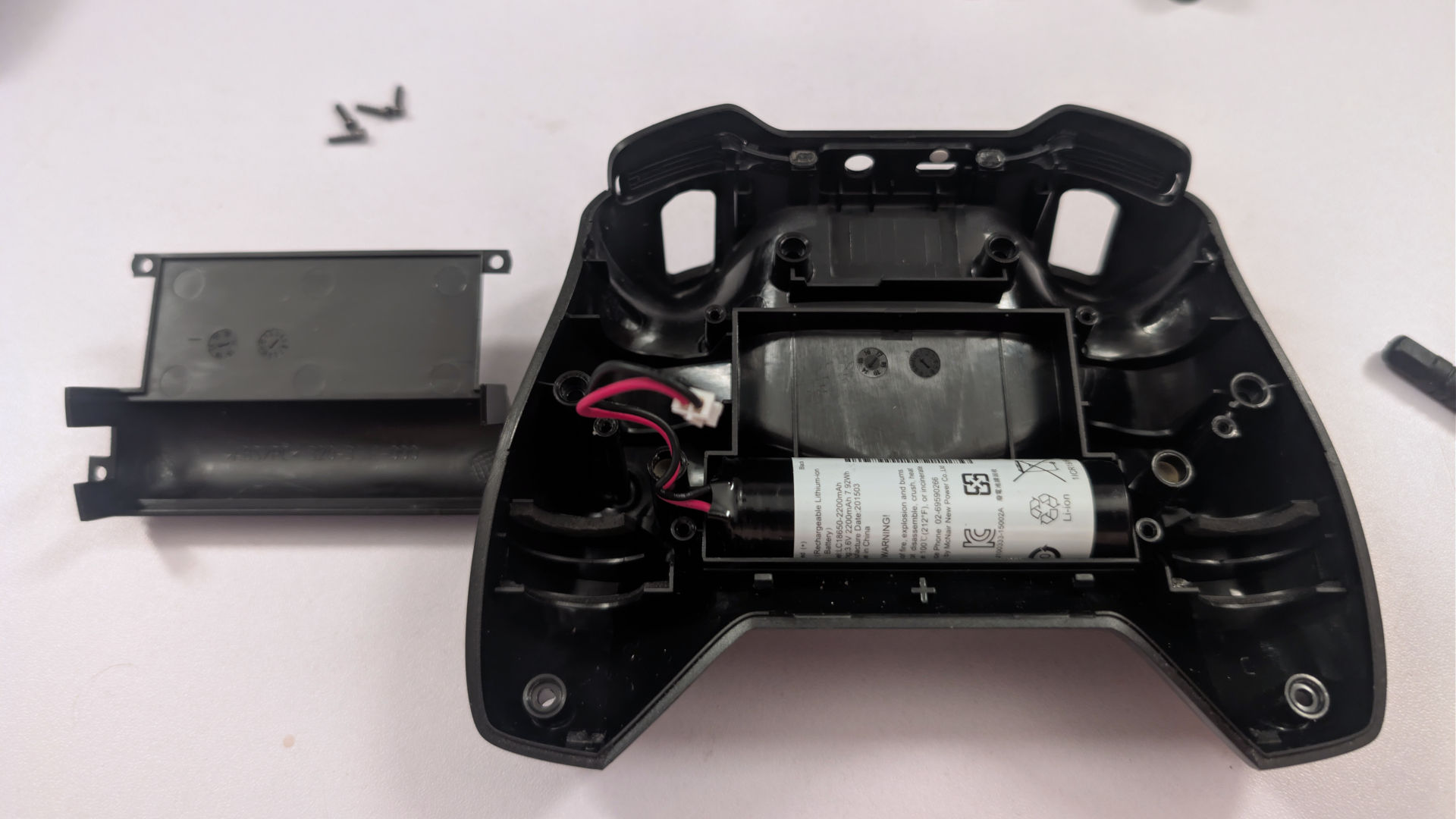
With four more T6 screws, we can remove the battery cage and see what was inside. We're not sure if this was intentional, but the battery cage of this controller is roomy as fuck. Even if we didn't have space for 18650 lithiums, we could also get away with using a flat-pack lithium-ion battery (up to 65mmx45mmx5mm)
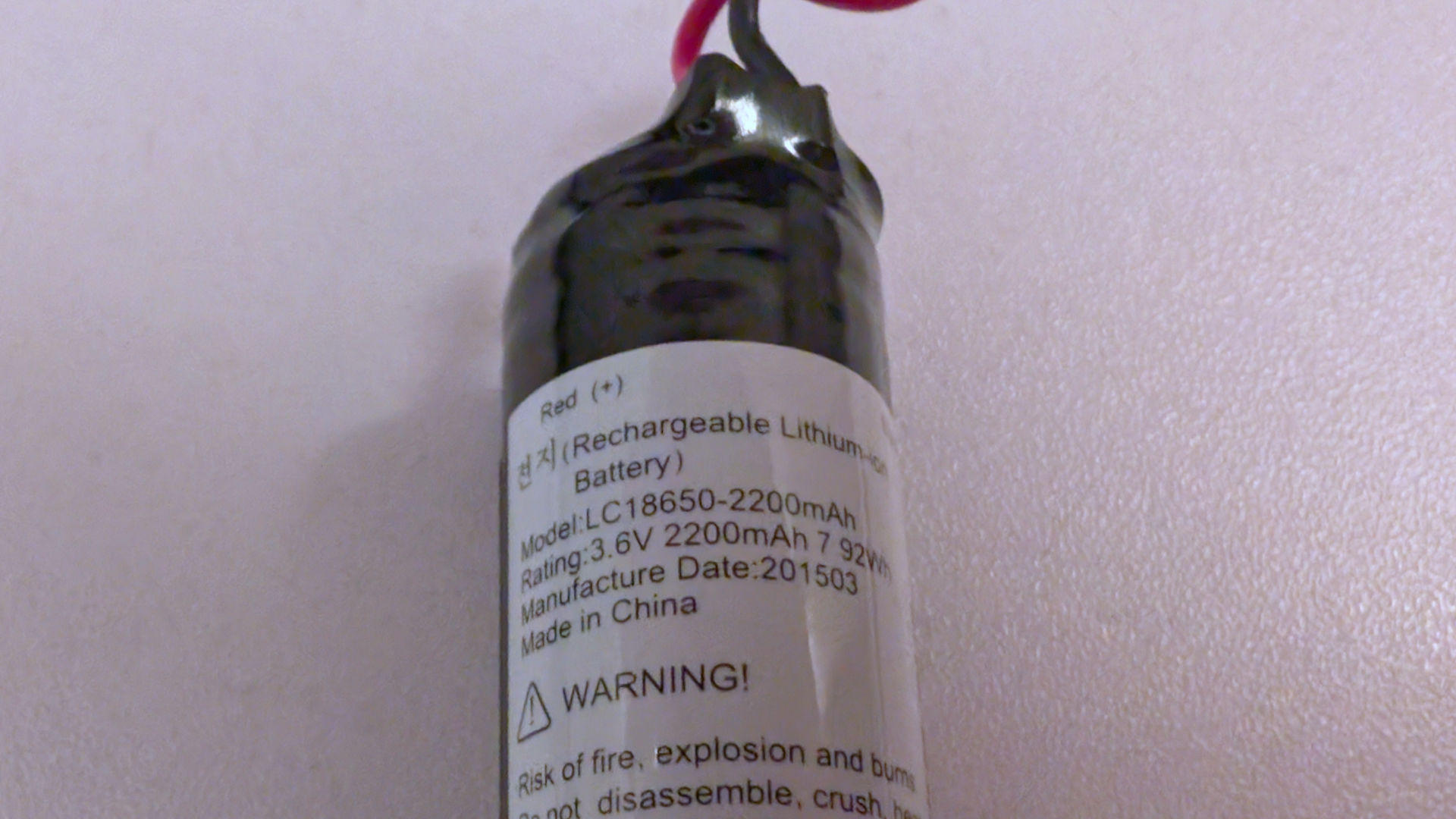
Usually, you don't find this level of documentation on a battery. Wow. But we can also tell just from the seal around everything that there's a safety circuit inside, which is good. The battery was produced in March 2015, which aligns with this controller.
Battery Check.
Now, because we assume this battery is a lost cause, resulting in us assembling out on 18650 with protective like of like what we did for our lora station. Let's hook it up to a more professional charging station to see if we can breathe life into this old beast. Since I already have JP2 female connectors, we don't have to touch the packaging of this battery.
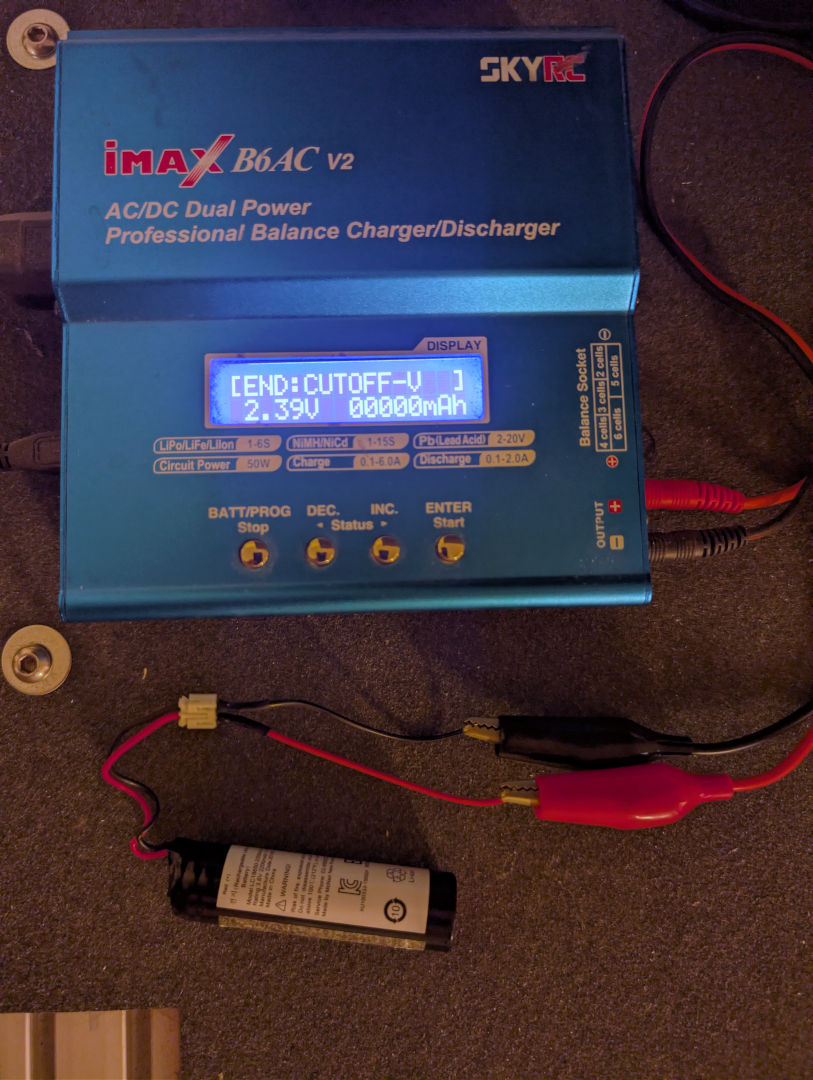
We first ran a discharge test to see if the battery could even talk to our IMAX B6AC. And despite the voltage being crazy low. It reported no error. Usually, anything below 2.7vdc, the lithium begins to take on some damage. Undervoltage can also result in the chemicals inside the battery changing, giving our test station a "NO CONNECTION - CHECK MAIN PORT."
This is what we were expecting when we plugged in this battery. The main charging circuit on the Nvidia Controller just gives up because it's too low.
With a real lithium charger in place. Just ramp up the power to see if we get close to 2200mAh.

For a ten-year-old battery. It's bouncing back like a champ! took a constant stream of 2amps and slowly ramped down when it should. But 2155Mah is an unfair assessment, going from 2.3vdc to 4.2vdc. So we're going to discharge and recharge this battery 3 times to get a more accurate reading. The reason why three times is that we want to see if the storage diminishes greatly between fully discharging and recharging the battery. Especially one of this age. We've seen older batteries charge at 2000mAh first charge, then 1900mAh second, then 1850mAh third.
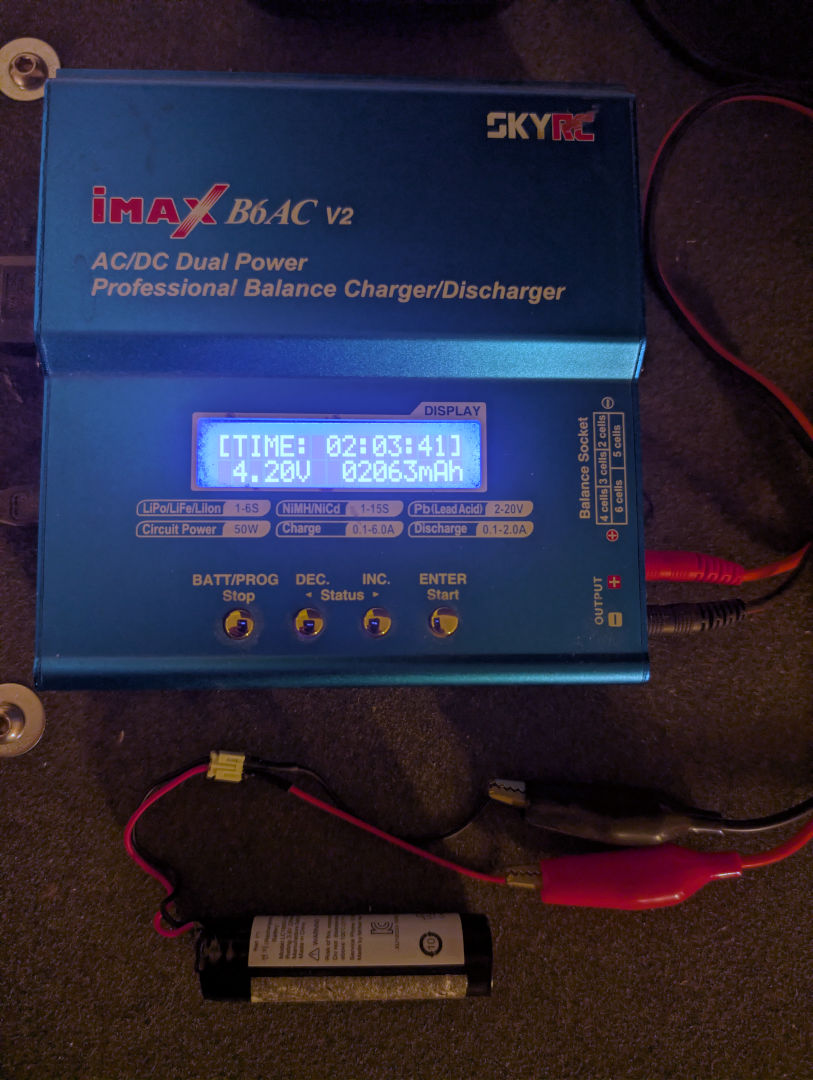 Apologies for the odd red tones coming off our camera. That 20x20 display is really fucking with color correction.
After cycling it 3 times, bring it up to fully charged four times in a row. We got 2021mAh, 2051mAh, and 2063mAh. Losing about 10 percent of your battery life over the course of 10 years is kinda remarkable. We're going to go with this. Of course, we could purchase a new 18650 battery from an eBay vendor for $10(USD). But for all we know, the quality could be absolute shit like SkyWolf batteries. Your average gamer is not rocking a lithium tester. To a diabolical vendor, giving gamers a 500mAh battery will still give them good reviews. Yeah, we have trust issues.
We're going to drop the power of these batteries by placing them in 'STORAGE' mode, which brings the voltage to 3.7vdc. This should allow the Controllers to power up just fine, but also if we plug the microUSB cable, we should also see an amber charge light on the back.
Testing time.
We have to be very specific about this with respect to our Nvidia Shield is Model Number P2897, which was the 2017-2019 edition, but NOT the 2019 Tegra+ edition that supports AI. We did try these controllers on another Nvidia Shield (Didn't get the model at the time, but will get it later), and surprise, surprise, didn't pair up at all. Even with us pressing the HOME button just below the Nvidia, the BACK button to the left of the Nvidia logo. and finally the Nvidia logo itself for 15 minutes, resetting it so the moment you power it up, it starts to flash immediately, waiting to pair with your system.
We've heard of complaints like this in the community, especially people who had an old Nvidia Shield and it died (due to fan/CPU failure or memory failure), bought a newer Nvidia Shield, and oopsy none of their controllers work.
AI is wrong because the Nvidia forums are wrong.
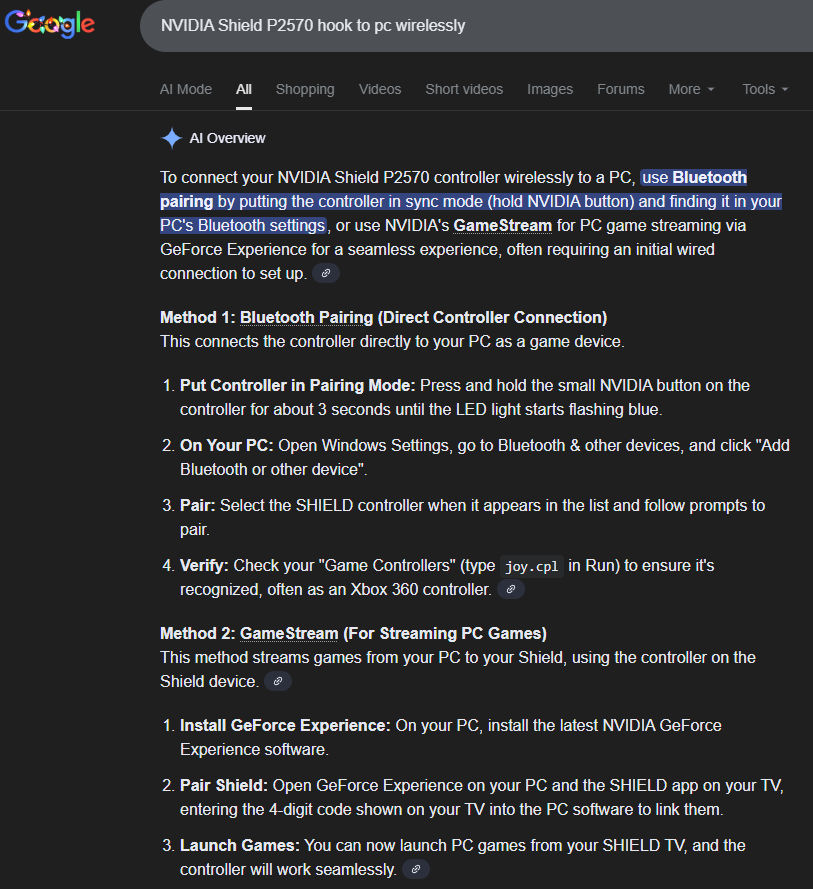
AI is wrong because it lacks the consciousness to self-correct. In a simplified expression, if billions of people tell AI the sky is red, with pictures backing it up. Then AI will assume Earth's atmosphere is red. This is what is happening inside the Nvidia Forums: the AI scrapes its data. When someone asks, "How do I reset my Nvidia Shield controller?" they fail to mention if they have the newer 2017 #P2920 model or the older 2015 #P2570 model. Everyone responds with the same answer. That ALL Nvidia Shield controllers can pair to Bluetooth. AI replicates this error and never does it questions the end user if this was the answer they were looking for. In part, because there are asshats like us who will mark it down for even showing up in the first place (We never asked Google to spew AI shit at me. It just does). This is why Silicon Valley takes the approach of arrogance, letting AI talk down to you instead of working with you. But that's outside of the scope of this posting.
The real answer is: IT CAN'T! IT HAS NO BLUETOOTH! 2.4Ghz only!!!
Nvidia themselves even side-step this answer and just tell people with PC's to plug the controller using your charging cable. Not really saying that's the ONLY solution you have if you have the 2015 model controller. Unlike the newer 2017 model, which CAN connect via Bluetooth. As a company, they seem deafly afraid to speak about what a product cannot do. Out of sight and out of mind.
So why are these controllers are as expensive or MORE expensive then the 2017 controller?
You got me. The only explanation we can come up with is that since it's now officially 10 years old, it's "RETRO," which is a neat way of marking antiquated technology up for no real good reason. Which we guess gets into the final part of our entry.
Reviewing 2015 in 2025 - How does the OG Nvidia controller feel?
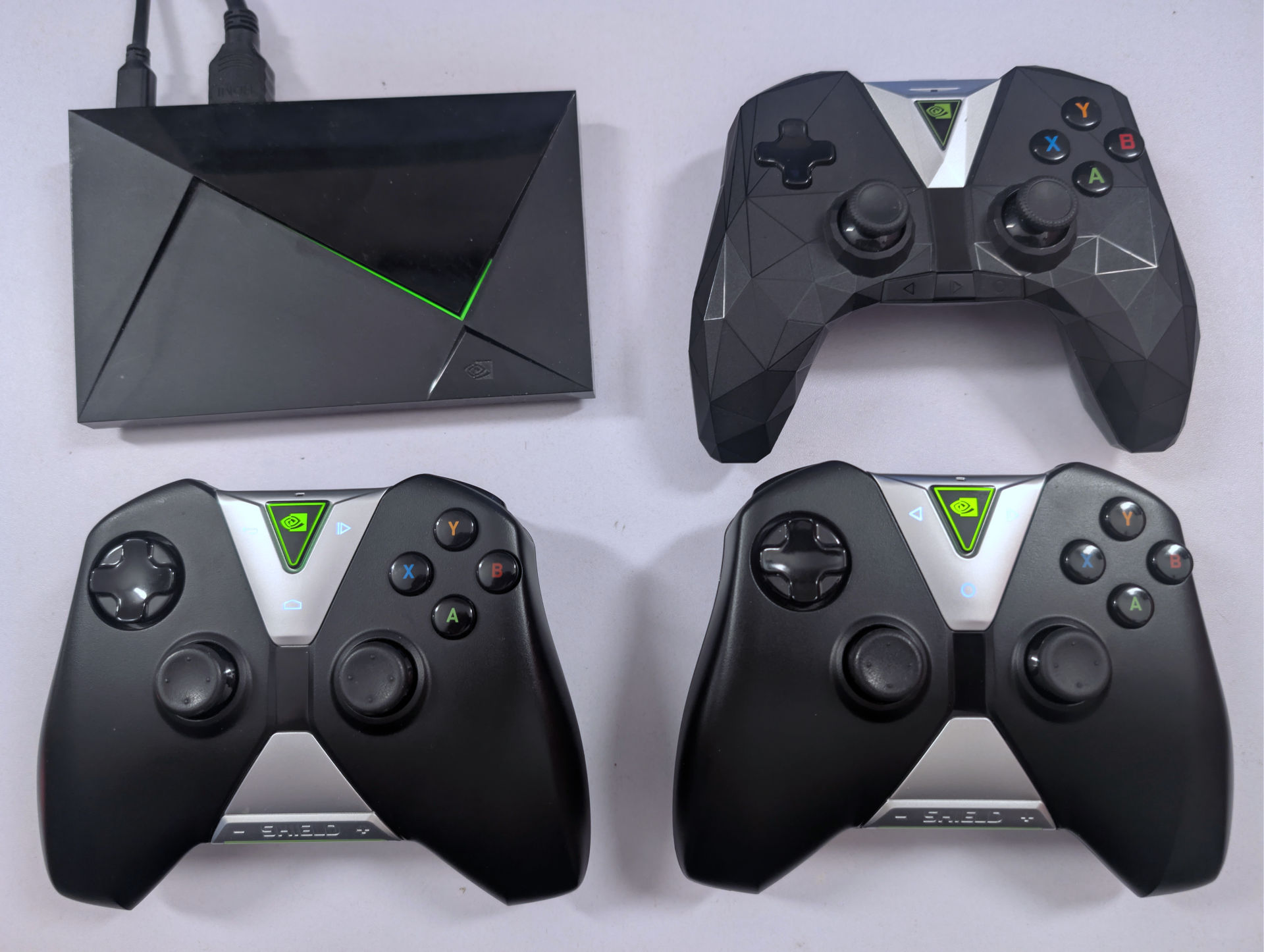
We're glad that we got two controllers to cross-check against. From a repair aspect, I actually enjoyed removing the battery from the 2015 controllers vs. the 2017. Sure, the two edge connectors would be annoying if we weren't already used to them from fixing laptops. But there's way less potential for pinch points causing the battery wires to come in contact/catch fire. If these controllers were more mainstream, I'd replace the plastic tapping screws with Phillips. But that's it.
Holding the controller is giving us some serious "Duke" OG Xbox controller vibes when we picked it up. Someone with smaller hands would certainly hate these controllers over the 2017 edition. But like the Duke controller. The D-Pad is total shit on these controllers.
We had to pay attention to my thumb as we were moving it around because the controller is a little too 'square' and it was making us move at angles instead of straight left/right when going through the menus. But to us, because Nvidia has some support issues going on, we wouldn't voluntarily purchase these controllers because there's too much risk that the console simply would be too new to accept them.
In 2025, it's not even worth the $30(USD) eBay sellers are trying to push these off for, no matter how 'RETRO' they might think.
What controller to purchase?
Now, as bloggers, we want to help out the average person. Perhaps you got an Nvidia Shield for Christmas, and it only has a remote (Fairly common package because %90 of Nvidia owners use it for streaming services). Perhaps you want a controller for your Nvidia so that you can use the Steam Link function to transfer games to your television. Or you want to load up your shield with RetroArch and play some classics. Just to give you two very good reasons why controllers on your shield is a very valid thing to try out.
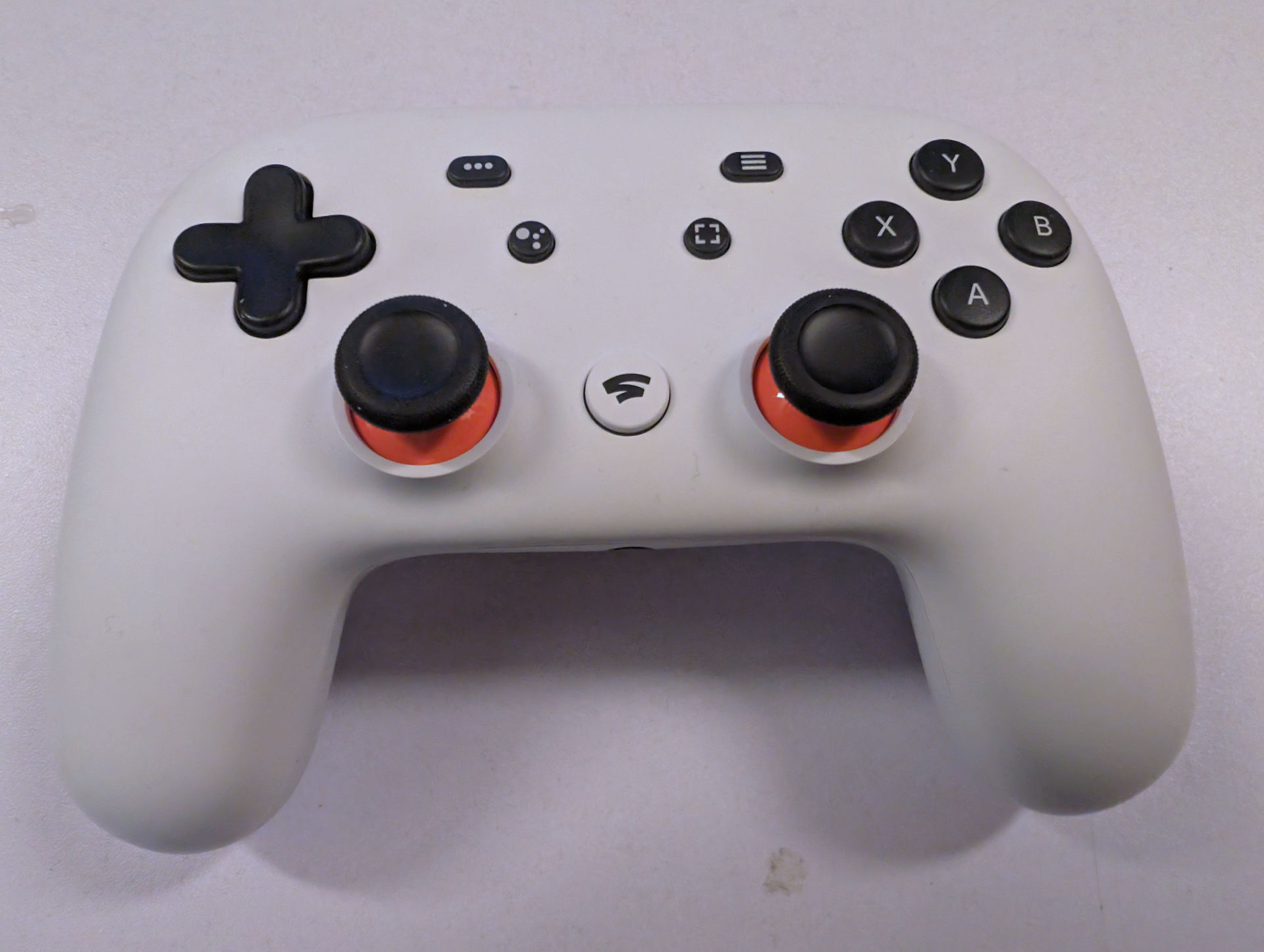 We say: Fuck Nvidia, get a Stadia Controller instead.
Even though the Stadia is now a dead product from Google, there's a lot to be said about their controller:
- It DOES support Bluetooth pairing. (If you purchase a brand new Stadia or a non-converted one. Google even supplies a website to convert it to a standard Bluetooth controller. This is one of the few times we'll say "Thank you!" to Google for recycling. Apparently, after December 31st, 2025, the primary website may go offline. In case that occurs, someone has to make a mirror, but warns it might brick your controller as it's just a copy of the original. Just press the "Y" and "Start" buttons in the middle, and that's it.
- Unlike the Ouya, which builds a UI from the ground up. Nvidia didn't. They rely completely on Google TV. The Stadia controller was designed for the Google TV OS. Sooooo..
- Unlike the Nvidia Shield controllers, which with shipping can jump anywhere from $35(USD)-45(USD), the Google Stadia controller is around $15(USD)-25(USD). Much better deal!
- Using your remote (or a USB keyboard), you can arrow over to Settings > Remotes and Accessories > Add Bluetooth accessories. On your Stadia Controller, press Y+Start to reset Bluetooth. You should see the Stadia controller appear in the menu. Pair, and you're done!
- You can take your Stadia back to your PC and Y+Start again to re-pair it back easy-peasy.
- It's faster to turn off or reboot your shield by using the "..." button on the Stadia.
- The D-Pad is much better than BOTH Nvidia controllers.
Granted, if you have a desktop PC, you will need Bluetooth to hook up. A USB Bluetooth adapter is around $8(USD). Not painful. Almost every laptop out there can do it out of the box. And you're not restricted to just Windows on this. Yeah, that's pretty much it.
Final thoughts.
We think the only reason to get a 2015 Nvidia Controller in 2025 is for those enthusiasts who really want a 'complete' collection. That perhaps they actually DO have a Gen 1 Nvidia Shield with the SSD card in perfect working order. Or they give no fucks about AI upscaling. If Nvidia wanted to keep their 2.4GHz band closed source, they should've at least done what Xbox did and presented a dongle for PC owners to use as another possible solution. Instead of using a flimsy USB-Micro data cable to hook to your PC like a third-party controller.
All in all, the Nvidia Shield as a streaming box is an amazing product because it's been going for 10 years, and it's still relevant because it can play 4k. This is due to Moore's law slowing down to where there should be 8k cinematic videos streaming by now, but little incentive for streaming providers to do that. As the entertainment industry is in a state of implosion, there's no incentive to further tax an already overburdened network. As for us. We embrace tradition, as there's a 'torrent' of reasons why. Especially in the anonymous I2P world.
That's what server said.
+++END OF LINE